
Kelly Coughlin, CPA
AI Bookkeeping for Small Business: What Claude, QuickBooks AI, and AI Accountants Can — and Can’t — Do
Artificial intelligence is moving into bookkeeping, accounting, tax preparation, cash-flow reporting, and financial analysis faster than most business owners realize.
You may have already seen people online saying they are using Claude, ChatGPT, QuickBooks AI, or another AI tool to categorize transactions, review bank statements, summarize profit and loss reports, find deductions, clean up QuickBooks files, or create financial dashboards.
Some of that is real.
Some of it is exaggerated.
And some of it is dangerous if a business owner assumes that “AI looked at my numbers” means the books are accurate, tax-ready, or useful for making business decisions.
The truth is this:
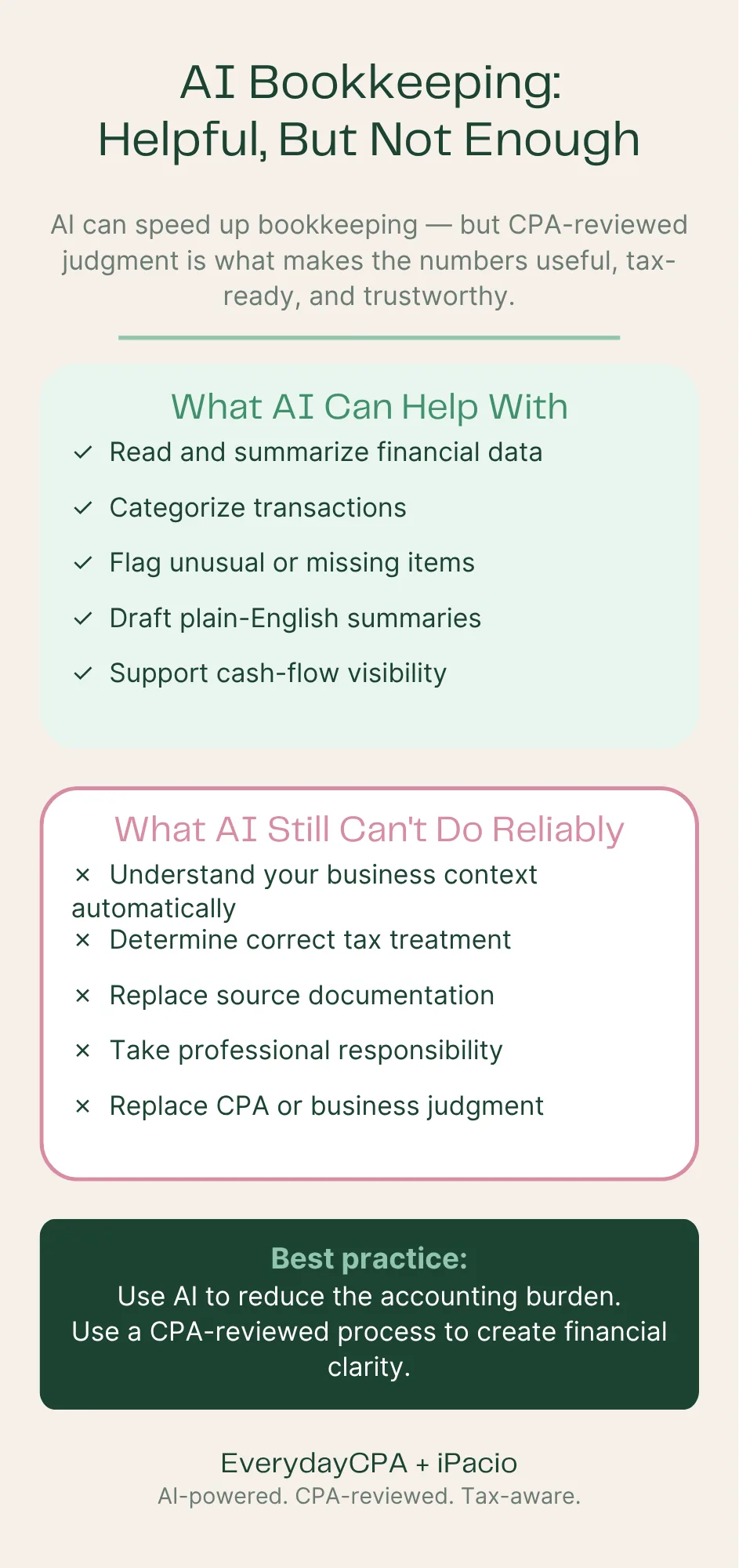
AI is becoming a powerful tool for bookkeeping and financial analysis. But AI by itself is not the same thing as accounting judgment, tax judgment, or business judgment.
For business owners, the question is no longer, “Will AI affect accounting?”
It already has.
The better question is:
What kind of AI bookkeeping can you actually trust — and where do you still need a real CPA or accountant involved?
That is what this article explains.
Why AI Bookkeeping Is Suddenly Everywhere
For years, business owners were told that software would make accounting easier.
QuickBooks, Xero, spreadsheets, bank feeds, rules, apps, dashboards, and integrations were all supposed to simplify the process.
But many business owners ended up with a different reality:
Bank feeds that imported transactions but did not explain them
Rules that categorized items incorrectly
Reports that looked official but did not answer real questions
Bookkeeping files that were technically “updated” but not tax-ready
Profit and loss statements that did not match the owner’s reality
Year-end surprises when the CPA finally reviewed the books
A growing feeling that the owner had become the bookkeeper
Now AI is entering that same space.
Tools like Claude, ChatGPT, QuickBooks AI, and specialized accounting AI platforms can read documents, summarize transactions, classify expenses, identify patterns, draft reports, reconcile certain data, and answer questions in plain English.
That is a major shift.
For the first time, business owners can imagine a world where they do not have to stare at a chart of accounts, learn accounting terminology, or spend weekends trying to figure out why QuickBooks says one thing and the bank account says another.
But there is a catch.
AI can process information quickly. That does not mean it understands your business, your tax position, your goals, your entity structure, your risk, or the difference between a transaction that is merely categorized and a transaction that is correctly treated for tax purposes.
That difference matters.
What AI Bookkeeping Can Do Well
AI is already useful for many bookkeeping-related tasks.
Used correctly, AI can save time, reduce clerical work, and help business owners see patterns faster.
Here are some of the areas where AI can be helpful.
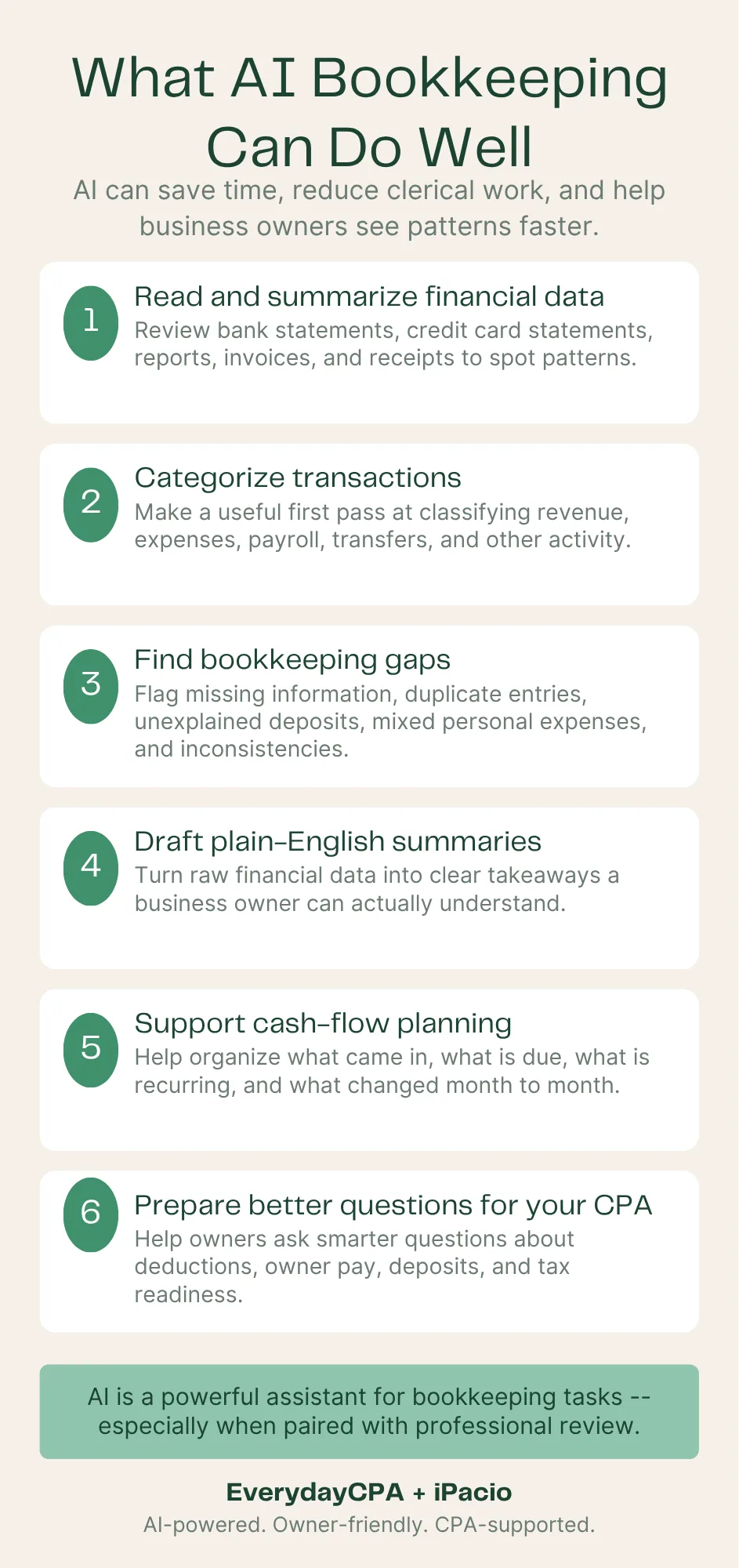
1. Reading and summarizing financial data
AI can review bank statements, credit card statements, spreadsheets, exported QuickBooks reports, invoices, receipts, and other financial documents.
It can summarize:
Revenue patterns
Expense trends
Unusual transactions
Repeated vendors
Large deposits
Cash-flow changes
Missing information
Possible duplicate expenses
Month-to-month changes
That can be useful, especially for a business owner who does not know where to start.
2. Categorizing transactions
AI can often make a reasonable first pass at classifying transactions.
For example, it may recognize that:
Home Depot may be materials or repairs
Stripe deposits may be sales
Gusto may be payroll
Google Workspace may be software
Uber may be travel
A bank transfer may not be income
A credit card payment may not be an expense
This can reduce manual work.
But “reasonable first pass” is the key phrase.
A transaction category is not always obvious from the vendor name alone. The same vendor can mean different things depending on the business.
A Home Depot purchase for a contractor may be cost of goods sold. For a real estate investor, it may be repairs or improvements. For a restaurant, it may be maintenance. For an owner using the wrong card, it may be personal.
AI can guess. A CPA or experienced accountant has to decide.
3. Finding bookkeeping gaps
AI can be good at spotting things that look incomplete or inconsistent.
For example:
Deposits that are not clearly explained
Expenses with no obvious business purpose
Large transfers between accounts
Payments that may be owner draws
Repeated transactions coded inconsistently
Negative balances
Unusual expense spikes
Missing months of statements
Duplicate entries
Personal expenses mixed into business accounts
This is one of the most valuable uses of AI in small business accounting.
Not because AI magically fixes the problem, but because it can help surface the problem faster.
4. Drafting plain-English financial summaries
Most business owners do not want a 12-page accounting report.
They want answers:
Did I make money?
Where did the money go?
Can I pay myself more?
Can I hire?
Can I afford taxes?
Am I overspending?
Are my books clean enough to file?
What should I fix before year-end?
AI can help turn raw financial data into plain-English summaries.
That is a major improvement over traditional accounting reports that assume the business owner already knows what to look for.
5. Supporting cash-flow planning
AI can help organize questions around cash flow:
What money came in?
What bills are coming due?
What payroll is expected?
What tax payments may be needed?
Which customers owe money?
Which expenses are recurring?
What changed compared to last month?
This does not replace financial judgment, but it can help business owners get a clearer view of what is happening.
6. Preparing better questions for your CPA
One underrated benefit of AI is that it can help business owners prepare better questions.
Instead of asking, “Can you look at my books?” the owner can ask:
“Why did meals and travel double this quarter?”
“Are these contractor payments properly documented?”
“Are these owner payments draws, payroll, or reimbursements?”
“Are these software subscriptions deductible?”
“Do these deposits look like revenue or transfers?”
“What needs to be fixed before tax season?”
That makes the CPA conversation more productive.
What AI Bookkeeping Still Cannot Reliably Do
AI is impressive, but bookkeeping and accounting are not just pattern recognition.
Accounting is a system of classification, documentation, judgment, tax treatment, consistency, and accountability.
That is where AI still has limits.
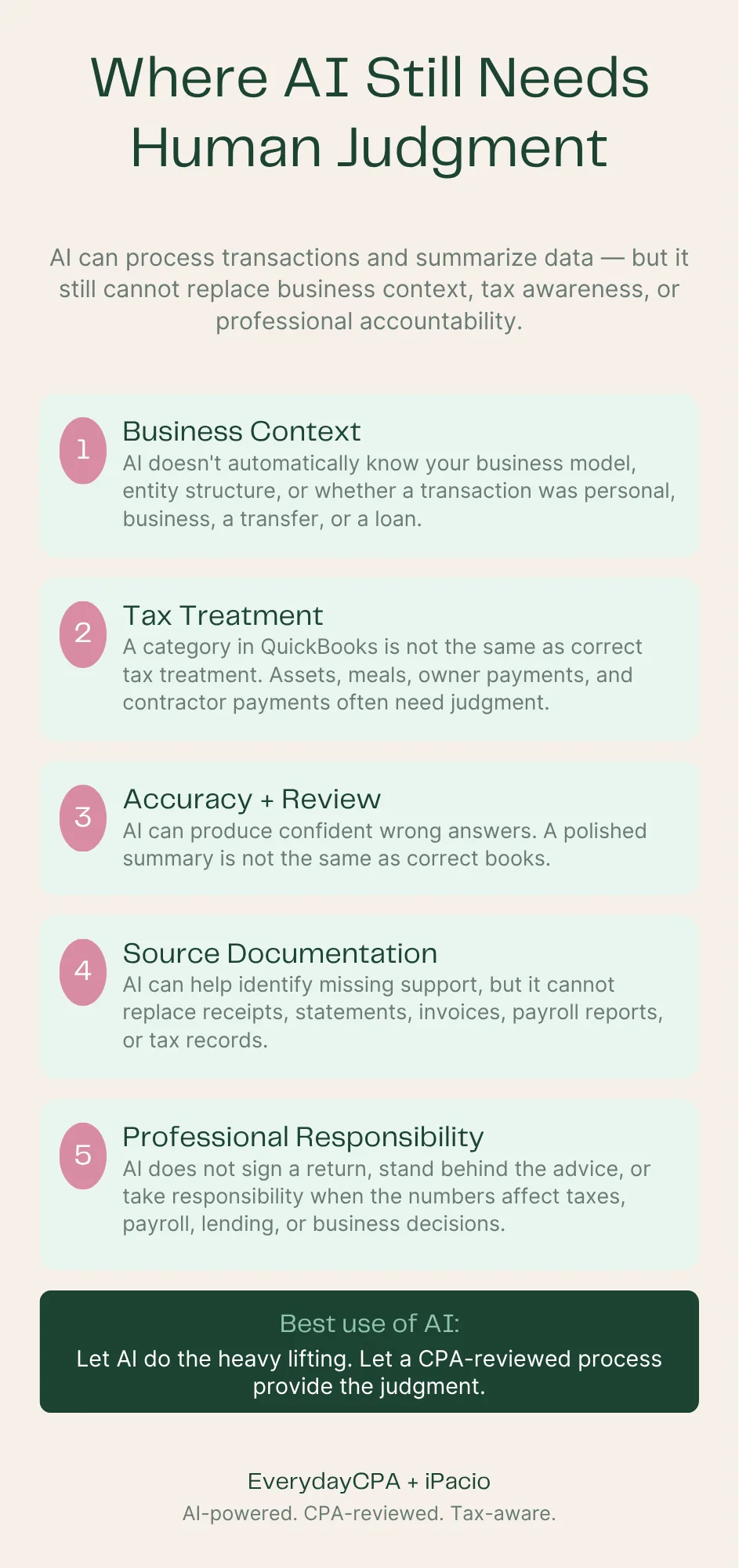
1. AI does not automatically know your business
AI may read a transaction, but it does not automatically understand your business model.
It may not know:
Whether you are a contractor, consultant, restaurant, real estate investor, e-commerce seller, creator, or professional service provider
Whether an expense is ordinary and necessary for your business
Whether a payment was personal or business
Whether a transfer was between accounts
Whether a deposit was revenue, loan proceeds, owner contribution, reimbursement, or refund
Whether an asset should be expensed, capitalized, or depreciated
Whether your entity structure changes the treatment
That context matters.
A generic AI tool can process text. It cannot automatically replace professional understanding of the taxpayer, the business, and the tax return.
2. AI may confuse bookkeeping categories with tax treatment
This is one of the biggest risks.
A transaction can be categorized in QuickBooks and still be wrong for tax purposes.
For example:
A vehicle expense may need mileage, actual-expense support, or personal-use allocation
A meal may be partially deductible, nondeductible, or fully deductible depending on context
A large equipment purchase may be an asset, not a simple expense
A payment to an owner may be a draw, payroll, loan repayment, or reimbursement
A contractor payment may create 1099 reporting requirements
A home office expense may require specific support
A transfer may look like revenue if it is not properly identified
A loan deposit may not be taxable income
A personal expense paid from the business account may not be deductible
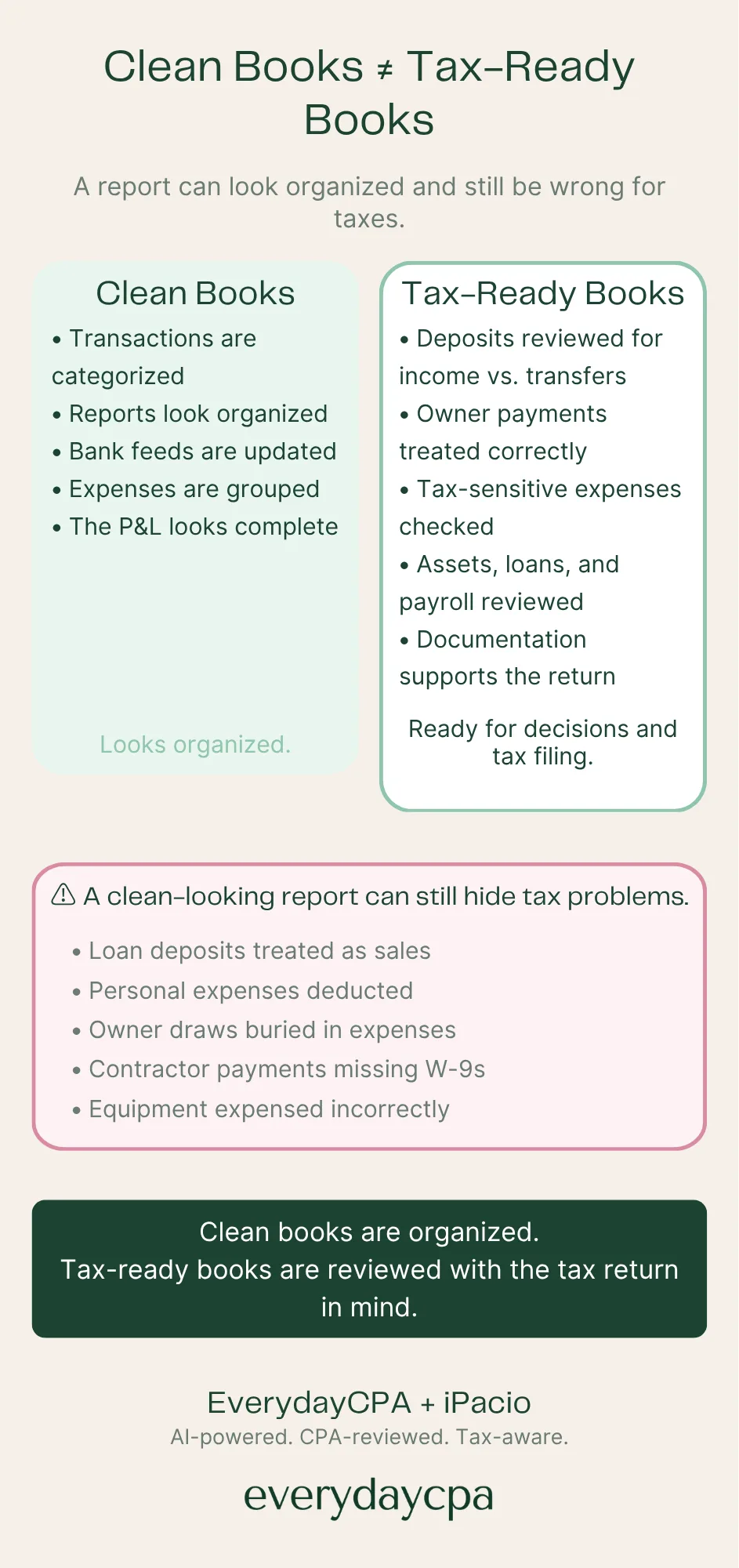
This is why “clean books” and “tax-ready books” are not the same thing.
Clean books are organized.
Tax-ready books are organized with the tax return in mind.
3. AI can produce confident wrong answers
AI tools are designed to produce helpful responses. That does not mean every response is correct.
In accounting, a confident wrong answer can be worse than no answer at all.
A wrong classification may:
Overstate revenue
Understate income
Miss deductions
Create unsupported deductions
Hide owner distributions
Misstate payroll
Confuse loans and income
Create tax exposure
Create bad business decisions
If a business owner uses AI without review, the output may look polished while still being wrong.
That is dangerous because polished reports create confidence.
But confidence is not accuracy.
4. AI does not replace source documentation
Tax-ready books require support.
That means the business owner may still need:
Bank statements
Credit card statements
Receipts
Invoices
Loan documents
Payroll reports
1099 records
Mileage logs
Closing statements
Asset purchase details
Owner contribution records
Reimbursement documentation
AI can help identify missing support, but it cannot magically create documentation that does not exist.
If the IRS or a state agency questions an item, “Claude categorized it that way” is not a tax defense.
5. AI does not take professional responsibility
This may be the most important point.
AI can assist.
AI can summarize.
AI can classify.
AI can flag.
AI can explain.
But AI does not sign your tax return, represent you before the IRS, understand your full financial life, or take professional responsibility for the advice.
A CPA-reviewed process is different from an AI-only process.
That difference matters when the numbers are used for:
Tax filing
Tax planning
Estimated payments
Loan applications
Payroll decisions
Hiring decisions
Owner compensation
Entity planning
IRS notices
Business sale planning
Investor or lender reporting
Business owners should not confuse automation with accountability.
Claude Accounting, QuickBooks AI, and the New Wave of AI Accountants
There are now several categories of AI accounting tools entering the market.
1. General AI tools like Claude and ChatGPT
These tools can help business owners analyze documents, summarize reports, draft explanations, and ask better questions.
They are flexible and powerful.
But they are general-purpose tools.
That means the quality of the output depends heavily on:
The documents uploaded
The prompt used
The user’s accounting knowledge
The completeness of the data
The business context provided
The review process afterward
A skilled CPA or accountant may use Claude or ChatGPT very effectively.
A business owner using the same tool without accounting knowledge may not know when the answer is incomplete or wrong.
2. QuickBooks AI and platform-based agents
QuickBooks and other accounting platforms are adding AI features directly into their products.
This makes sense. QuickBooks already has the data. AI can help make that data easier to use.
But business owners should understand the difference between software assistance and professional advice.
QuickBooks may help organize, automate, and explain information. But it still may not answer the deeper questions:
Is this the right tax treatment?
Are these books ready for a tax return?
Is this entity structure still right?
Should I be making estimated tax payments?
Am I paying myself correctly?
Is this report telling the truth?
What should I do differently next quarter?
Software can help.
But software does not know your entire business and tax picture unless someone connects the dots.
3. AI accounting startups
A growing number of companies are building AI tools for accounting firms, finance teams, and businesses.
Some focus on:
Transaction coding
Reconciliations
Month-end close
Journal entries
Workpapers
Audit support
Variance analysis
Financial reporting
Data extraction
Cash matching
These tools are valuable, especially for accounting teams.
But many of them are designed for accountants, not business owners.
That means they may help the professional do the work faster, but they do not necessarily solve the owner’s real problem:
“I do not understand my numbers, I do not trust my books, and I do not want to become an accountant.”
4. DIY AI bookkeeping workflows
This is the category exploding on social media.
Tax professionals, accountants, bookkeepers, and tech consultants are showing workflows where AI reads bank statements, categorizes expenses, drafts client reports, or reviews QuickBooks exports.
Some of these workflows are useful.
Some are clever demos.
Some are not ready for real client work.
The problem is that social media rewards impressive-looking output. It does not always show the review process, the errors caught, the source-document limitations, the security setup, or the professional judgment needed before the work can be trusted.
Business owners should be careful.
A demo is not a system.
A prompt is not a process.
A spreadsheet is not a set of books.
And an AI summary is not the same as CPA-reviewed financial clarity.
Clean Books vs. Tax-Ready Books
This is where many business owners get surprised.
Your books can look clean and still not be tax-ready.
A clean-looking profit and loss report may still hide problems:
Personal expenses mixed with business expenses
Business expenses paid personally and never recorded
Transfers counted as income
Loan proceeds treated as sales
Owner draws buried in expense categories
Contractor payments missing W-9 information
Vehicle expenses without support
Meals, travel, and entertainment treated inconsistently
Equipment purchases expensed incorrectly
Revenue deposits not matched to actual business activity
Payroll not reconciled to tax filings
Credit card payments counted twice
Prior-year items posted in the wrong year
AI may catch some of these issues.
A good bookkeeper may catch others.
A CPA reviewing the books through a tax lens should be looking for a different question:
Are these numbers ready to become a tax return?
That is the standard business owners should care about.
Not “does QuickBooks have categories?”
Not “does the report look clean?”
Not “did AI produce a summary?”
The real question is:
Can I trust these numbers for taxes, planning, and decisions?
Why Business Owners Still Feel Lost Even With QuickBooks
QuickBooks is powerful software.
But for many business owners, QuickBooks creates a new job they never wanted.
They have to:
Connect bank accounts
Review bank feeds
Create rules
Pick categories
Reconcile accounts
Understand reports
Fix duplicates
Track receipts
Separate personal and business activity
Prepare for tax season
Decide what is deductible
Know when to ask for help
That is a lot.
Most business owners did not start a business because they wanted to become part-time accountants.
They want to run the business.
They want to serve customers.
They want to make money.
They want to build wealth.
They want to avoid tax surprises.
They want to know what decisions to make next.
That is why AI bookkeeping is attractive.
But the answer is not simply “let AI do it.”
The better answer is:
Use AI to reduce the accounting burden, but keep professional judgment in the loop.
The Right Way to Use AI in Small Business Accounting
AI should not replace accounting judgment.
AI should support it.
Here is what a safer AI-assisted accounting process should include.
1. Source data collection
Start with real documents:
Bank statements
Credit card statements
QuickBooks reports
Payroll records
Loan statements
Invoices
Receipts
Prior-year tax returns
Business description
Entity information
AI is only as good as the information it receives.
Incomplete data produces incomplete conclusions.
2. Business context
Before categorizing transactions, someone needs to understand the business.
Questions matter:
What does the business sell?
How does it get paid?
What accounts are business vs. personal?
Who are the owners?
Are there employees?
Are contractors used?
Is inventory involved?
Are there loans?
Are there multiple entities?
Is the business cash-basis or accrual-basis?
What tax return will these numbers support?
Without context, AI is guessing.
3. AI-assisted classification
AI can help classify transactions into broad groups:
Revenue
Cost of sales
Operating expenses
Payroll
Owner draws
Transfers
Loan payments
Personal items
Tax-sensitive categories
Items needing review
This can save time.
But every classification should be reviewable.
4. Exception review
The highest-value accounting work often happens in the exceptions.
These include:
Unusual transactions
Uncategorized expenses
Large deposits
Duplicates
Possible personal items
Missing documentation
Questionable deductions
Tax-sensitive categories
Items that changed from prior months
Transactions that do not match the business model
AI should flag these.
A human should review them.
5. CPA-level tax awareness
This is where AI-only bookkeeping often falls short.
The books should be reviewed with tax questions in mind:
Are deposits properly classified?
Are owner payments treated correctly?
Are contractor payments documented?
Are meals and travel supportable?
Are assets handled correctly?
Are estimated taxes needed?
Are deductions being missed?
Are tax risks being created?
Does the profit number make sense?
Is the business ready for tax filing?
This is not just bookkeeping.
This is tax-aware financial clarity.
6. Owner-friendly reporting
The final output should not be a confusing accounting report.
It should answer the owner’s real questions:
What do I have?
What came in?
Where did the money go?
What looks risky?
What needs to be fixed?
What should I do next?
Am I ready for taxes?
What should I ask my CPA?
This is where AI can be extremely useful when paired with professional review.
What Business Owners Should Ask Before Trusting an AI Bookkeeping Tool
Before relying on any AI bookkeeping system, ask these questions.
1. Who reviews the output?
Is the work reviewed by a CPA, accountant, or trained professional?
Or is the business owner expected to trust the AI output?
2. Is the tool built for business owners or accountants?
Some tools are designed for accounting professionals. They may be powerful but still confusing to the owner.
Business owners need clarity, not another technical system to manage.
3. Can I see the source behind the conclusion?
If AI says a transaction is deductible, can you see why?
If AI says revenue changed, can you trace it back to the data?
If AI flags a category, can you review the transactions?
Source traceability matters.
4. Does it understand tax readiness?
Bookkeeping and tax preparation are connected, but they are not the same.
Ask whether the system flags tax-sensitive issues, not just bookkeeping categories.
5. Does it protect my data?
Financial data is sensitive.
Before uploading bank statements, QuickBooks exports, payroll records, or tax documents, business owners should understand how the information is stored, used, shared, and protected.
6. Does it help me make decisions?
A tool that categorizes expenses is useful.
A system that helps you understand cash flow, taxes, profitability, and next steps is more valuable.
7. What happens when something is wrong?
This is the accountability question.
If the output is wrong, who fixes it?
If the tax return is affected, who helps?
If the books are inaccurate, who takes responsibility?
AI does not replace that question.
The Future Is Not AI vs. Accountants
Many people talk about AI as if it will replace accountants.
That is the wrong frame.
The future is not AI vs. accountants.
The future is:
AI plus accountable professionals vs. outdated manual workflows.
Business owners do not need more software to learn.
They need a system that gives them reliable answers.
AI can help with the heavy lifting:
Reading documents
Organizing transactions
Identifying patterns
Drafting summaries
Flagging exceptions
Preparing reports
Explaining trends
But the professional layer still matters:
Judgment
Tax treatment
Business context
Review
Accountability
Planning
Representation
Advice
The best accounting systems will combine both.
AI should make the CPA more useful, not invisible.
What “CPA-Reviewed AI Bookkeeping” Should Mean
The phrase “AI bookkeeping” is not enough.
A better standard is CPA-reviewed AI bookkeeping.
That means:
AI helps gather and organize the data
AI helps classify and summarize transactions
AI helps find exceptions and patterns
A CPA or qualified professional reviews the output
Tax-sensitive issues are flagged
The owner gets plain-English financial clarity
The final result supports better decisions and cleaner tax preparation
This is the difference between automation and confidence.
Business owners should not be asked to choose between doing everything themselves or blindly trusting software.
There is a better middle ground:
Technology does the heavy lifting. Professionals provide the judgment. Owners get clarity.
How EverydayCPA Thinks About AI, Bookkeeping, and Financial Clarity
At EverydayCPA, we believe most business owners were never trained to be accountants.
That is not a character flaw.
That is reality.
A contractor should not have to become a bookkeeper to know whether he made money.
A consultant should not have to spend weekends fixing categories to prepare for taxes.
A restaurant owner should not need to understand every QuickBooks rule to know whether cash flow is tightening.
A real estate investor should not have to guess whether expenses are repairs, improvements, personal items, or tax-sensitive transactions.
A business owner should not be flying blind just because the accounting software is complicated.
That is why our approach is built around financial clarity.
Not just bookkeeping.
Not just tax filing.
Not just software.
Financial clarity means the owner can answer the questions that actually matter:
Can I trust these numbers?
Where is the money going?
Am I ready for taxes?
What might be costing me money?
What needs to be cleaned up?
Can I pay myself more?
Should I make an estimated tax payment?
Can I hire?
Is the business actually profitable?
What should I do next?
AI can help us get there faster.
But the goal is not to make the business owner an AI prompt engineer.
The goal is to give the business owner better answers.
The EverydayCPA + iPacio Direction
EverydayCPA is building around a simple idea:
Business owners should not have to do accounting to get financial clarity.
iPacio is designed to support that idea by helping organize financial information, surface patterns, and make the numbers easier to understand.
The direction is not “AI replaces the CPA.”
The direction is:
AI-powered financial clarity with CPA accountability.
That matters because business owners do not just need a categorized spreadsheet.
They need useful answers.
They need tax-ready books.
They need a plan.
They need someone who can explain what the numbers mean.
They need someone who can connect bookkeeping, tax, cash flow, owner pay, and business decisions.
That is where AI alone is not enough.
Signs You May Need More Than AI Bookkeeping
AI bookkeeping tools may help, but you probably need CPA-reviewed help if any of these are true:
Your books are more than two months behind
You filed an extension because your numbers were not ready
You do not know whether your business made money last month
You are mixing personal and business expenses
You have multiple bank accounts or credit cards
You use QuickBooks but do not trust the reports
You have contractors and are unsure about 1099s
You have payroll
You are unsure whether you should be an LLC or S corporation
You received a large tax bill last year
You are not making estimated tax payments
You have loan deposits, transfers, or owner contributions in the books
You are using spreadsheets because QuickBooks feels too complicated
You are making business decisions based on your bank balance
You want tax-ready books before year-end
If several of these apply, the issue is not just bookkeeping.
It is financial clarity.
What to Do Before Tax Season
If you want to avoid year-end tax surprises, do not wait until your tax return is due.
Start with these steps.
1. Gather three months of statements
Collect business bank and credit card statements for the most recent three months.
This is enough to reveal patterns.
2. Identify all business accounts
Make sure you know which bank accounts, credit cards, payment processors, payroll systems, and loan accounts are connected to the business.
3. Look for personal/business mixing
Review whether personal expenses are being paid from business accounts or business expenses are being paid personally.
This is one of the most common cleanup issues.
4. Review deposits carefully
Not every deposit is revenue.
Deposits may include:
Sales
Transfers
Loans
Owner contributions
Refunds
Reimbursements
Payment processor settlements
Misclassified deposits can create serious tax problems.
5. Review owner payments
Owner payments need to be treated correctly.
Depending on the entity, they may be draws, distributions, payroll, reimbursements, loans, or something else.
This is not an area to guess.
6. Flag tax-sensitive expenses
Pay special attention to:
Meals
Travel
Vehicles
Home office
Equipment
Contractors
Repairs vs. improvements
Insurance
Payroll
Professional fees
Software
Personal items
7. Get a plain-English review
Do not stop with a report.
Get an explanation.
You should know what the numbers mean, what looks risky, what needs cleanup, and what action to take before tax season.
AI Bookkeeping FAQ
Can AI do bookkeeping for a small business?
AI can assist with bookkeeping by reading financial documents, categorizing transactions, summarizing reports, and identifying unusual items. But AI should not be treated as a complete replacement for professional review, especially when the books will be used for taxes, lending, payroll, or major business decisions.
Can Claude do accounting?
Claude can help analyze financial documents, summarize reports, identify patterns, and support accounting workflows. But using Claude well requires good source data, clear prompts, business context, review, and professional judgment. Claude can be helpful, but it is not the same as a CPA-reviewed accounting process.
Is QuickBooks AI enough for my business?
QuickBooks AI may help automate tasks and explain information inside QuickBooks. But business owners may still need help interpreting the reports, correcting errors, preparing for taxes, and making business decisions. QuickBooks can organize data. A CPA-reviewed process can help determine whether the data is accurate, tax-ready, and useful.
What are tax-ready books?
Tax-ready books are books that are organized, reviewed, and prepared with the tax return in mind. That means revenue, expenses, transfers, owner payments, assets, payroll, contractor payments, and tax-sensitive categories have been reviewed before tax filing begins.
Are clean books and tax-ready books the same thing?
No. Clean books may look organized, but tax-ready books require a tax-aware review. A profit and loss statement can look clean while still containing misclassified deposits, unsupported deductions, personal expenses, or incorrect owner payments.
Can AI find tax deductions?
AI may help identify possible deductions or unusual expenses, but deductions depend on facts, documentation, business purpose, tax law, and entity structure. AI can help surface possibilities. A qualified tax professional should review them.
Is AI bookkeeping safe?
AI bookkeeping can be safe when used with proper data security, source tracking, review controls, and professional oversight. Business owners should be careful about uploading sensitive financial records into tools without understanding how the data is stored and used.
Do I still need a CPA if I use AI bookkeeping?
In many cases, yes. AI can help with organization and analysis, but a CPA can help interpret the numbers, review tax treatment, identify risks, plan estimated taxes, prepare returns, and advise on decisions. AI is a tool. A CPA provides judgment and accountability.
Final Thought: Do Not Just Automate Confusion
AI will change bookkeeping.
That is already happening.
But business owners should be careful not to use AI to simply automate the same confusion they already had in QuickBooks.
If the old problem was, “I have reports but do not understand them,” the new problem cannot become, “I have AI summaries but still do not know if they are right.”
The goal is not more output.
The goal is clarity.
The right accounting system should help you understand what happened, what it means, what needs to be fixed, and what to do next.
That is the future of small business accounting:
AI-powered, CPA-reviewed, tax-aware financial clarity.
And for business owners who are tired of doing accounting, that future cannot arrive fast enough.
Want tax-ready financial clarity without doing your own accounting?
EverydayCPA helps business owners turn messy books, bank statements, and QuickBooks confusion into plain-English financial clarity.
Book a call with Kelly or Cat and find out whether your books are ready for taxes — or what needs to be fixed before year-end.