
Kelly Coughlin, CPA
QuickBooks Bookkeeping Mistakes And How to Avoid Them
QuickBooks is not the problem.
Bad QuickBooks is the problem.
A lot of business owners think that because the bank feed is connected, the books are “basically done.” Transactions are flowing in. The dashboard has numbers. The profit and loss report exists. So everything must be fine.
Not necessarily.
QuickBooks can be a useful tool, but it does not know your business the way you do. It does not automatically know the difference between a loan payment, an owner draw, a transfer, a reimbursed expense, a deductible purchase, or something that should never hit the profit and loss statement at all.
That is where the trouble starts.
Bad bookkeeping does not just make your reports ugly. It can cause missed deductions, inflated income, bad tax estimates, owner compensation problems, cash flow confusion, and a painful conversation with your CPA in March.
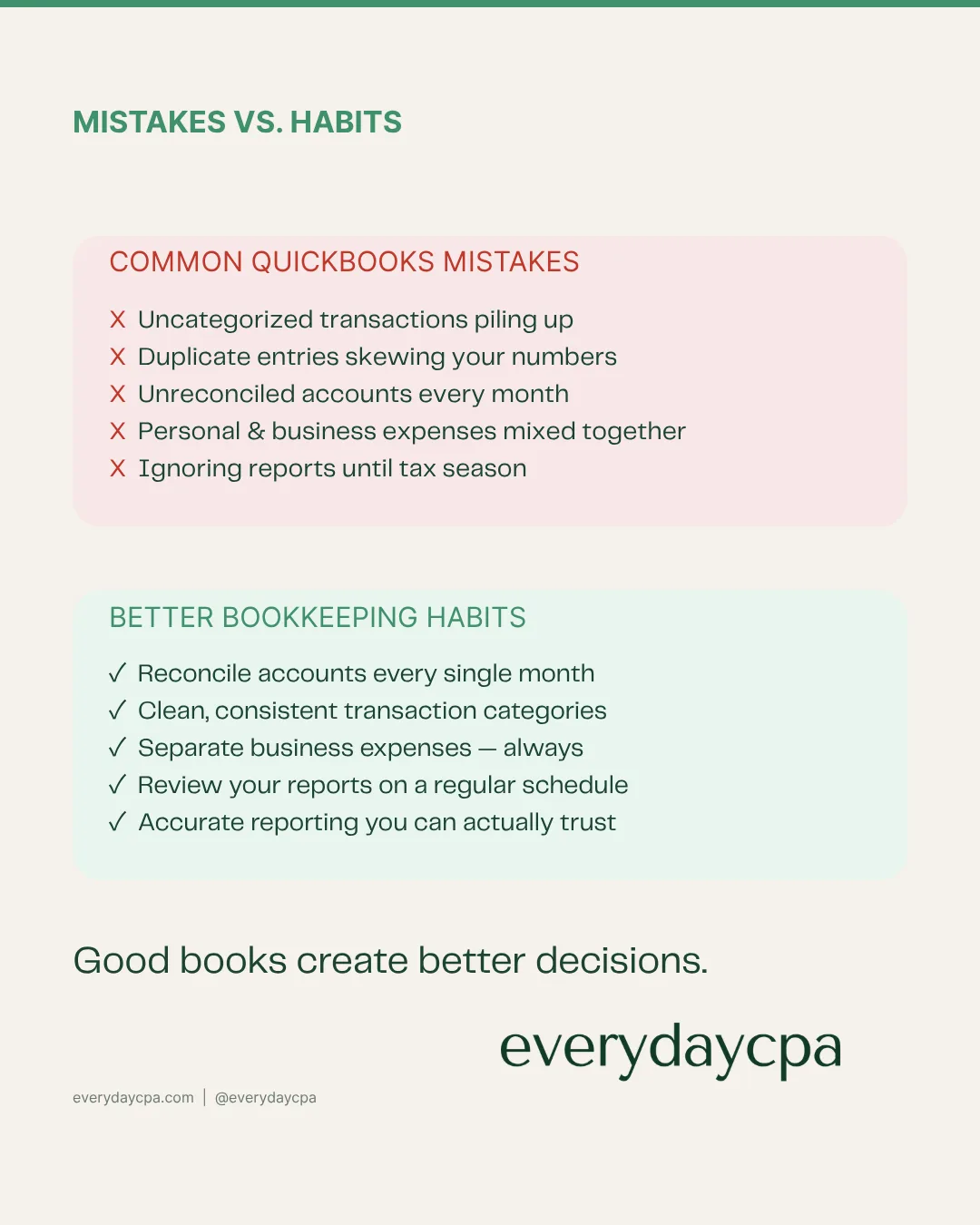
Here are the QuickBooks bookkeeping mistakes we see most often — and how to avoid them.
Mistake 1: Trusting the bank feed too much
The bank feed is helpful, but it is not bookkeeping.
QuickBooks can pull transactions from your bank and credit card accounts, but that does not mean the transactions are coded correctly. It only means they arrived.
The most common problem is assuming that imported transactions equal accurate books.
They do not.
A transaction can be imported and still be wrong. It can be duplicated, miscategorized, posted to the wrong account, treated as income when it is not income, or treated as an expense when it is really a transfer or loan payment.
How to avoid it
Do not treat the bank feed as the final answer. Treat it as raw material.
At least monthly, someone needs to review the categories, match transfers, reconcile bank and credit card accounts, and make sure the books agree to the actual statements.
The question is not, “Did the transaction import?”
The question is, “Is the transaction right?”
Mistake 2: Not reconciling accounts
Reconciliation is where bookkeeping becomes real.
A lot of owners skip this step because QuickBooks looks current. The bank balance shows. The transactions are there. Reports can be printed.
But if the accounts are not reconciled, you do not know whether the books match reality.
That means your profit and loss may be wrong. Your balance sheet may be wrong. Your cash position may be wrong. Your tax return may be built on numbers that do not tie out.
How to avoid it
Reconcile every bank account, credit card account, loan account, and major payment account on a regular schedule.
Monthly is best.
If you are behind, do not panic. Start with the most recent month and work backward, or get help cleaning up the file. But do not keep making decisions from unreconciled books.
Unreconciled books are not business records. They are a guess.
Mistake 3: Coding transfers as income or expenses
This is one of the biggest QuickBooks mistakes.
Money moving between your own accounts is usually not income. It is usually not an expense either.
But QuickBooks does not always know that.
Transfers between checking, savings, credit cards, payment processors, payroll accounts, and owner accounts can easily end up in the wrong place. When that happens, your revenue may look too high, your expenses may look too high, or both.
That creates bad reporting and bad tax planning.
How to avoid it
Create a clear process for transfers.
When money moves between business accounts, make sure it is recorded as a transfer, loan movement, owner contribution, owner draw, or balance sheet activity — not random income or expense.
This matters because your tax return should be based on real business activity, not money bouncing between accounts.
Mistake 4: Mixing personal and business expenses
Many business owners do this accidentally.
They use the business card at Home Depot, Amazon, Costco, restaurants, gas stations, Apple, or a phone provider. Some purchases are business. Some are personal. Some are mixed.
QuickBooks sees a transaction. It does not know the story.
If personal expenses are buried inside business categories, the books become unreliable. If business expenses are paid personally and never entered, deductions can be missed.
Both problems are common.
How to avoid it
Use separate business bank and credit card accounts whenever possible.
If a personal expense hits the business account, code it correctly as an owner draw or similar equity transaction. If a business expense is paid personally, capture it with documentation and reimburse it properly or record it correctly.
Do not let personal and business spending live in the same bucket.
That bucket becomes a tax-season mess.
Mistake 5: Treating loan payments as simple expenses
Loan payments are often recorded incorrectly.
The full payment may leave the bank account, but that does not mean the entire payment is deductible.
Part of a loan payment is usually principal. Part may be interest. The principal portion reduces the loan balance. The interest portion may be an expense. If the whole payment is dumped into one expense category, the profit and loss is wrong and the loan balance is wrong.
How to avoid it
Set up loans properly on the balance sheet.
Then split each payment between principal and interest, using the loan statement or amortization schedule.
This is especially important for equipment loans, vehicle loans, lines of credit, SBA loans, real estate loans, and business financing.
If the loan is wrong in QuickBooks, the tax return may be wrong too.
Mistake 6: Ignoring owner draws and owner compensation
Owner pay is one of the most misunderstood areas in small business bookkeeping.
Sole proprietors, LLC owners, S-corp shareholders, partners, and employees are not all handled the same way.
Money taken by the owner may be a draw, distribution, guaranteed payment, payroll, reimbursement, loan repayment, or something else depending on the entity structure.
QuickBooks will not solve that automatically.
How to avoid it
Make sure the bookkeeping matches the entity type.
An LLC taxed as a sole proprietorship is different from an S-corp. A partnership is different from a corporation. An owner draw is different from payroll.
This is where bookkeeping and tax strategy have to talk to each other.
If your books do not reflect how the owner is supposed to get paid, your tax planning will be weaker than it should be.
Mistake 7: Using too many categories
More categories do not always mean better books.
Some QuickBooks files have hundreds of expense categories. Every new purchase gets its own account. Every vendor gets a category. Every random transaction becomes a new line item.
That creates clutter, not clarity.
A messy chart of accounts makes it harder to see what is happening and harder to prepare a clean tax return.
How to avoid it
Simplify the chart of accounts.
Use categories that help you understand the business and prepare the tax return. Do not create a new category unless it actually helps decision-making, tax reporting, or management.
The goal is not to track everything in the most complicated way possible.
The goal is to get clean, usable numbers.
Mistake 8: Letting old mistakes roll forward
QuickBooks mistakes do not usually stay in one month.
If something was coded wrong last year and never fixed, the mistake may still affect this year. Bad beginning balances, old uncleared transactions, duplicate entries, negative accounts, old loans, stale receivables, and mystery equity balances can sit in a file for years.
Owners get used to seeing them, so they stop noticing.
But those old problems can still distort the books.
How to avoid it
Do a cleanup review before relying on the numbers.
Look at the balance sheet, not just the profit and loss. Old balances, negative accounts, and strange categories are clues that something may be wrong.
A clean profit and loss is good.
A clean balance sheet is better.
Mistake 9: Waiting until tax season to fix everything
This is the big one.
When bookkeeping is ignored all year, tax season becomes cleanup season. That means the CPA is trying to prepare the return, fix the books, ask questions, identify missing documents, explain surprises, and meet deadlines all at the same time.
That is expensive and stressful.
It also means there is very little time left for planning.
By March or April, many of the best tax moves are already gone.
How to avoid it
Clean up the books before year-end.
Better yet, keep them clean monthly.
Tax strategy works best before December 31. If the books are not current until after the year ends, you are no longer planning. You are documenting what already happened.
Mistake 10: Thinking QuickBooks replaces a CPA
QuickBooks is software.
It can organize transactions, generate reports, and help track activity. But it does not know whether your entity structure makes sense. It does not know whether your owner pay is reasonable. It does not know whether your tax strategy is working. It does not know whether your books support the decisions you need to make.
That is not a software problem.
That is a strategy problem.
How to avoid it
Use QuickBooks as a tool, not the whole accounting system.
The system should include clean monthly books, tax review, owner compensation planning, year-end projections, and practical advice about what to do next.
QuickBooks can hold the data.
A CPA-led process should help you understand what the data means.
The real goal: tax-ready, decision-ready books
The goal is not perfect bookkeeping for its own sake.
The goal is to know:
What came in
Where it went
What you owe
What you can deduct
What needs to change
Whether your current setup still makes sense
That is what clean books are supposed to do.
They should help you make better decisions, reduce tax surprises, and stop guessing.
Need QuickBooks cleanup?
If your QuickBooks file is out of date, miscategorized, unreconciled, or impossible to trust, you do not need another tutorial.
You need a cleanup plan.
EverydayCPA helps business owners clean up messy QuickBooks files, connect the books to the tax return, and decide what to do next.
That may mean fixing QuickBooks.
It may mean moving to monthly bookkeeping.
It may mean using iPacio for a simpler monthly clarity process.
It may mean changing your entity structure or tax strategy once the real numbers are visible.
Start here:
Or learn more here:
And if you want to start with a free resource: